 bilifast
bilibili keeps buffering?
Watch in 4K, at 2x, and seek without stalls
bilifast is a free, open-source Chrome extension. While you watch on bilibili.com, it fetches video from several bilibili CDN nodes at once and reads ahead, so the player no longer runs out of buffer and spins.
- Just the extension, nothing else to install
- No data collected
- Open source (MIT)
Tested: the same 4K video, with and without
bilibili's own player locked to 4K, same network, same video, in order: 1x → 2x → seek to 60% → 3x. Shorter bars are better.
Author's test on 2026-10-29: home connection in Japan, logged in, BV1bE41127s6 (4K 2880×2160), Chrome 156, default medium preset. Results vary by network and time of day; if your connection is already fast you may not notice much.
Why it stalls, and what the extension does
bilibili's video CDN throttles every request separately, and the web player sends only one request at a time. In 4K, at high bitrates or at fast speeds the player needs more than one request can deliver, so the buffer runs dry and it starts spinning.
Without bilifast
One request at a time, never filling your bandwidth.
With bilifast
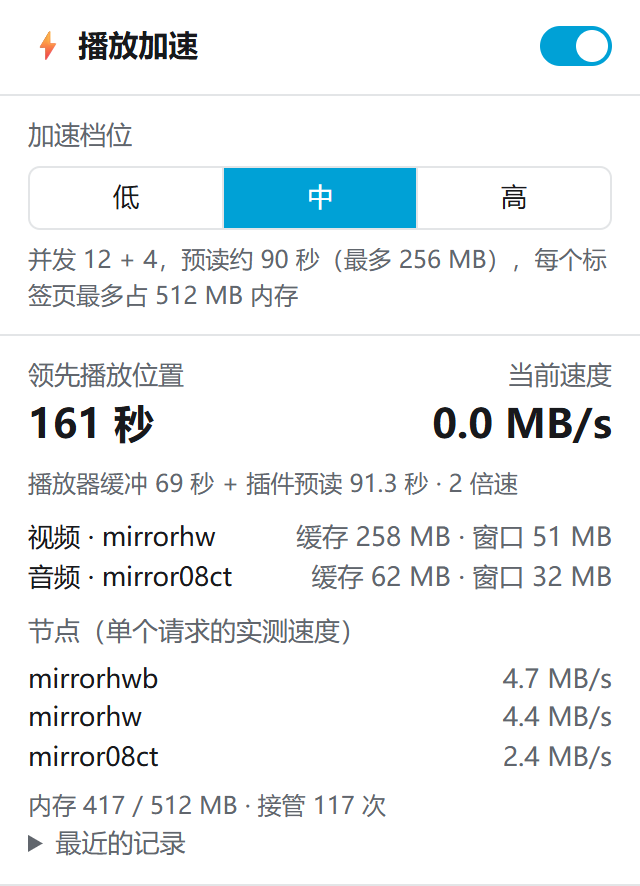
Splits requests into 1 MB chunks, fetches them in parallel from the fastest nodes it measures, and reads about 90 s ahead (more at faster speeds).
The video, danmaku, comments, quality switching and watch history are all still bilibili's own; you watch exactly as before. If anything goes wrong it falls back to a direct connection and the video keeps playing. Technical details (in Chinese): PLAY_EXTENSION.md.
How to use it
Works on video, list and bangumi pages on www.bilibili.com, including switching parts, switching quality and autoplay. Requires Chrome 111 or later.
Install
Click Add to Chrome on the Chrome Web Store. It updates itself.
Reload the video page
Open or reload a bilibili video page and watch as usual. Nothing to set up.
Adjust if you like
Click the toolbar icon to turn it on or off and pick low / medium / high. The number on the icon is seconds buffered ahead.
Privacy
- The only permission is
storage, to remember the switch and preset on your computer. - Doesn't read cookies; collects and uploads no data; no analytics, no ads.
- Runs only on bilibili video, list and bangumi pages.
- Video data goes only between your browser and bilibili's video servers.
Full details in the privacy policy. All the code is open source, so you can check it yourself.
FAQ
Why does bilibili keep buffering in the browser?
A common cause: bilibili's video CDN throttles each request separately, and the web player sends one request at a time. 4K, high bitrates and fast playback speeds need more than one request can deliver, so the buffer runs out and the player spins. A slow connection or evening congestion on your side also causes stalls, and the extension can do less about those.
Is it safe? What permissions does it need?
Only storage, and no access to site data. It runs only on bilibili video, list and bangumi pages, loads no remote code, and the source is public on GitHub.
Will it affect my bilibili account?
It doesn't read cookies or touch login, comment or watch-history requests. It only downloads the video segments the player was going to download anyway, in parallel chunks from bilibili's own video servers, using the same video URLs.
Does it work in Edge or other browsers?
It has only been tested in Chrome 111 and later. Edge and other Chromium-based browsers can install extensions from the Chrome Web Store, but the author hasn't tested them yet. Firefox and Safari are not supported.
Can it download bilibili videos?
No, it only speeds up online playback. To save videos as mp4, try bilidl by the same author; both can be installed side by side.
Does it speed up live streams or bilibili players embedded on other sites?
No, only video, list and bangumi pages on www.bilibili.com.
Can I watch premium or paid videos with it?
No. Premium and paid content restrictions are unchanged; anything you couldn't watch before, you still can't.
My connection is already fast. Do I need it?
You may not notice much difference. Try it, and turn it off from the popup any time; when off, it's as if it weren't installed.